Drafts and revisions
Compare saved versions and replay the recorded development of the assignment.
Reasonleaf is a prototype assignment workspace. Students write and save drafts; it records AI help used inside the workspace. Teachers review that history, ask students to explain their choices and keep feedback with the submission.
Configure the assignment and permitted AI help.
Record drafts, sources and in-workspace AI conversations.
Review the evidence and document feedback.
In the prototype, the final submission sits beside saved drafts, recorded assistance and the student’s explanation. Teachers can compare versions, choose a follow-up question and save feedback with the work.
Compare saved versions and replay the recorded development of the assignment.
Read the requests and responses captured inside the assignment workspace.
Inspect source entries and recorded pastes. Ask for context where the origin is unknown.
Read why a student changed their argument and what assistance they declare.
Reasonleaf records activity inside its assignment workspace. It does not monitor other apps or prove independent authorship.
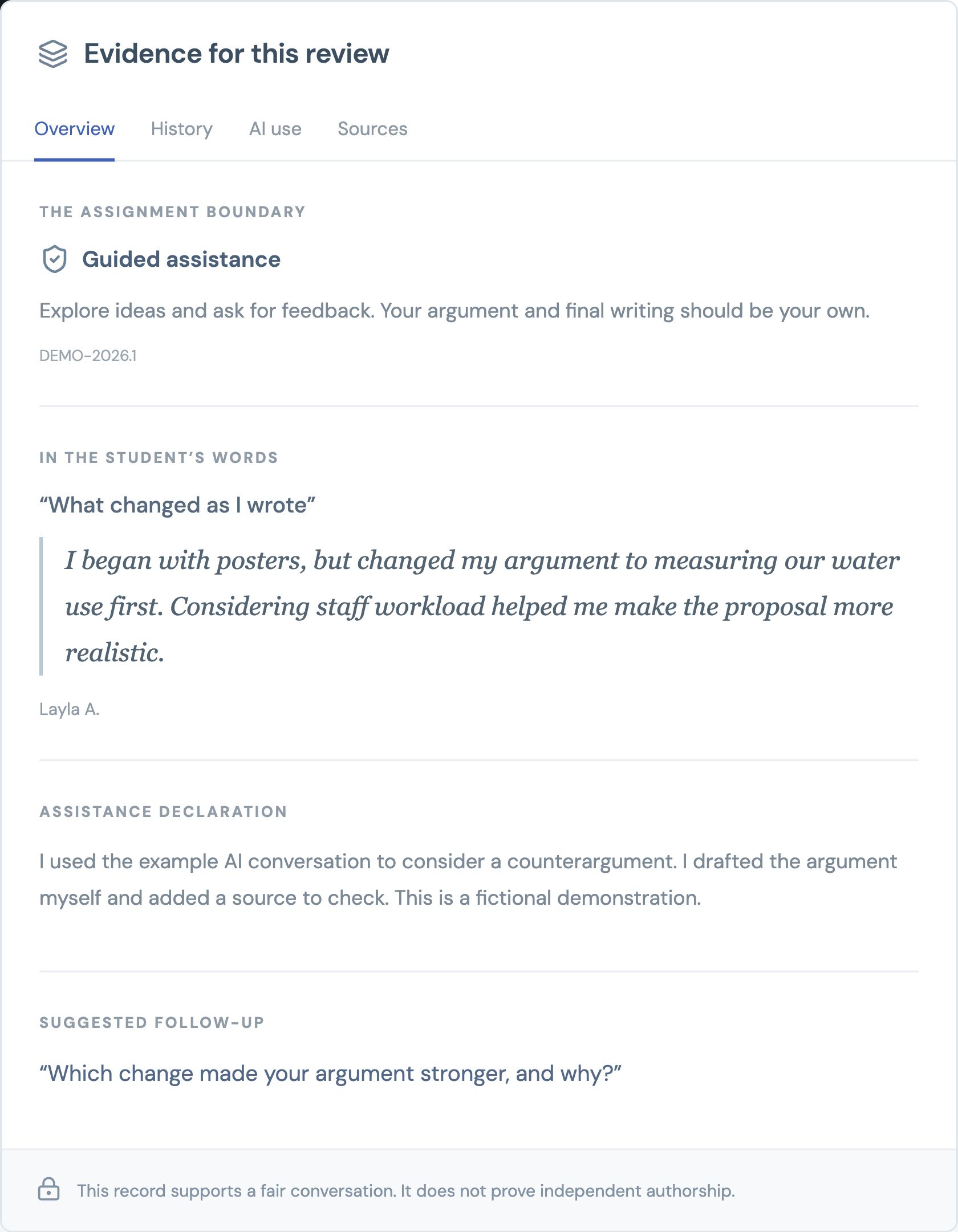
A draft written elsewhere, language support or a pasted passage needs context. Reasonleaf includes the student’s explanation and the teacher’s feedback in the record. No automated misconduct verdict is produced.
See saved drafts, recorded AI assistance and the student’s explanation together. Use that record to ask a focused follow-up and document feedback.
What we want to test with your teachers: whether that record makes gathering evidence and completing a review easier.
Reasonleaf currently uses a separate prototype workspace. Connections to existing school platforms remain planned.
Book a discovery callTell us what happens at your school. We’re speaking with educators to understand where reviewing student work takes too long, or leaves questions unanswered.
We’ll send a short summary of your review workflow, the gaps we identify together and whether a focused prototype could help.
No preparation, pupil records or purchase commitment needed.
Talk through a recent assignment and the tools they use today.
Discuss missing evidence, unclear rules or extra review time.
Agree if there is a specific problem worth exploring together.
Opens Google Calendar in a new tab.
Choose an available time in your timezone.
Explore the proposed workflows: what students would submit, what teachers would review and what still needs building. The current prototype starts with writing.
Review how an argument developed alongside the final submission.
Subject examples describe the intended workflows. The current prototype demonstrates writing, draft checkpoints, recorded assistance and teacher review. Specialist subject tools are labelled as planned.
Keep paper in the classroom. The proposed workflow connects a submitted page to a teacher’s annotation and, where needed, an observed check of understanding.
2x + y = 11First equationx − y = 1Second equation3x = 12Teacher selects this stepx = 4, y = 3Submitted answer“Why does adding the equations eliminate y?”
A photo or scan is attached to the question, with any outside help declared. It is labelled submitted working, not verified independent work.
The original image stays available. A teacher can request an explanation of a particular calculation or change of method.
If needed, the student explains the step or solves a variation under observation. A typed explanation completed at home can also be AI-assisted.
Keep the explanation, prompting required and next teaching step with the assignment. A difficult follow-up does not automatically establish misconduct.
Reasonleaf cannot see another device or an unrelated AI chat. A student can copy an external answer by hand or type it into the workspace. Neither handwriting nor typing history establishes where that reasoning originated.
Recorded activity
Shows what happened inside Reasonleaf. An upload timestamp shows when a page was submitted.
Student declaration
Describes the help a student says they used. It is not an independently verified activity record.
Teacher observation
Documents understanding demonstrated in that setting. It does not prove authorship of the original homework.
How could our school use water more responsibly?
A general claim becomes a specific, testable proposal.
Compare what changed.
Choose a stage above to exploreReasonleaf shows the selected rule in the student’s workspace and keeps that policy version with the submitted work.
Students can explore ideas, request feedback and plan research within the assignment’s selected mode.
Teachers can inspect the recorded guidance, later revisions and the student’s explanation.
Illustration of the prototype’s six modes. These are school-defined settings, not certified curriculum policy packs. Live AI behaviour still requires evaluation.
Assignment settings work in the prototype. The next layer lets schools maintain reviewed policy packs, define exceptions and control who can access the records.
Planned policy packs connect school, curriculum, awarding body, subject and assessment requirements. Teachers would start from a rule approved for the subject, year group and assessment type, and request exceptions where needed. Practice and assessment can permit different help.
Planned school identity and role permissions separate student, teacher and leadership access. These controls are required before real pupil use.
The prototype exports an assignment record. Production adds reliable shared storage, audit history, school-controlled retention and deletion.
Compare total assignment setup, review and follow-up effort with current practice. Check whether students understand the permitted help and whether teachers can document useful decisions. Time savings have not yet been established.
Five connected modules explain what Reasonleaf does now and what the school platform must add next.
Students write, save checkpoints, add sources and explain changes. Teachers can compare the development of a piece with its submitted version.
Start with an assignment
Choose an assignment’s AI mode and record assistance used inside the workspace. The demo uses labelled rehearsal responses; live OpenAI requires configuration and evaluation.
OpenAI integration
Inspect drafts, recorded assistance, sources and the student’s explanation together. Add feedback and export the review record. Similarity evidence remains planned.
Human judgment at the centre
Planned policy packs connect school, curriculum and assessment requirements, with version history and approved exceptions. Assignment-level AI modes work in the prototype.
School-wide consistency
Planned school identity, role permissions, retention, deletion and audit controls make the records suitable for institutional use. These are requirements before pupil data.
Institutional readiness
The first workflow connects AI rules, student work and teacher review. Curriculum policy, similarity and institutional controls extend it.
Where we are todayA British coursework task, an IB essay and a CBSE project can require different assistance rules. We plan to encode reviewed requirements into assignment settings, with Arabic and English workflows evaluated alongside the teachers who use them.
Planned coverage includes British, IB, CBSE, CISCE, American and UAE MoE pathways. Arabic writing direction is demonstrated. Full localization, reviewed policy packs and bilingual AI evaluation remain planned.
The KHDA, DP World Foundation and MIT RAISE programme brings responsible AI learning into core subjects, including English and Arabic.
Dubai Media Office — AI literacy, in everyday subjects.February 2026ADEK’s AI literacy initiative connects classroom practice with safeguards for privacy, cognitive agency, academic integrity and human oversight.
ADEK — Independent thinking stays central.September 2026The Ministry of Education introduced AI into the public-school curriculum from KG to Grade 12 for the 2025–26 academic year.
Emirates News Agency — A national commitment to AI learning.May 2025These initiatives provide context for our work. Reasonleaf is an independent project and is not endorsed by these organisations.